Download Annamalai Assignment
PDF for Distance Learning
on time is very important as these assignments are part of student internal marks.
Download the Annamaial assignment for the different programs.
Understanding Distance Education Annamalai University Assignment
The Annamalai University assignment is very important, especially for the distance education learners. Completing and submitting the assignment is important for all students. These assignments are counted as an Internal assessment of AUDE courses. These assignments must be completed; failing to do so may result in consequences for that semester. The university takes these assignments to give student an opportunity to learn research, understand the subject, and improve their writing skills.
Before submitting the assignment, students should read and understand the guidelines properly, follow the given format, and any mistakes can lead to rejection of the assignment. In this section, we will learn how to make the Aude assignment, front page PDF download, and more.
AUDE Assignment PDF
How to Check Annamalai University Assignment Status for Distance Courses
According to the latest update, the assignment submission deadline is 29th November. If Students want to check the Annamalai University assignment status for their distance learning courses, they should visit the official website of AUDE. On the home page, the students of Annamali University distance education have received their enrollment numbers to log in.
Through their student portal, student can choose their course code to check the subject assignment status, and when they click on submit, the assignment status will display whether the assignment submission is pending, under evaluation, or if the assignment is submitted ot not. The assignment submission tab helps students understand the process of receipt and marking progress.
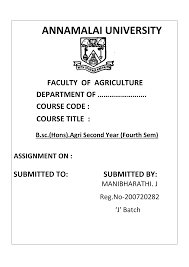
Download Annamalai University Assignment Front Page PDF
How to Prepare Annamalai University Assignment for Distance Education
Making sure that student submit their assignment correctly is very important because the university follows a strict structure while evaluating the assignments. Before starting to work on their assignment, the student should download Annamalai University’s assignment front page PDF, download the assignment, read the instructions carefully, and then start working on the assignment in a clear, organised manner. The Annamalai University assignment should follow the official format and include the correct front page.
AUDE Assignment recommendation
| S.NO | SHEET RECOMMENDATIONS | DETAILS |
|---|---|---|
| 1 | Annamalai University Assignment Front Page Details | The Annamalai University assignment front page PDF must be printed and used as the first page. It includes: • Student Name • Enrollment Number • Programme Code • Course Code • Course Title • Academic Year • Study Centre • Signature and Date |
| 2 | Handwritten Work | All AUDE assignments must be handwritten. Use clear handwriting. |
| 3 | Neatness | Use a black or blue pen. Avoid overwriting. |
| 4 | Margins | Leave proper margins on all sides of each page so the examiner can make remarks. |
| 5 | Pagination | Number every page of your assignment. Also, write your enrollment number on each page. |
| 6 | Stapling / Binding | Staple or bind the pages in the correct order. |
How to Submit Annamalai University Assignment for Distance Courses
The assignment must be in correct form; students need to attach the front page, write neatly, and submit the assignment before the deadline either to the study centre or the online student portal, where students can check the status of their assignment.
Steps to Submit Your Annamalai University Assignment
- Prepare Your Assignment Fully: Complete and submit all assignments, attach the Annamalai University assignment front page PDF, and arrange the page correctly.
- Check Your Study Centre Details: Submit the assignment to the study centre mentioned on your ID card or admission confirmation.
- Visit the Study Centre for Submission: The assignment should be a handwritten assignment file, and it should be at the assignment counter. They will verify your enrollment number and course code.
- Take the Acknowledgment Slip: The study centre will give a stamped receipt as proof of submission. Keep it safe until the results are declared.
- Postal Submission (If Allowed for Your Centre): Some AUDE centres allow submission by registered post.
- Check Assignment Status Online: After 20–30 days, visit the AUDE portal and check your Annamalai University assignment status to confirm that it has been updated.
- Submit and Save Confirmation: Check all the details again, submit the form, and save the confirmation you receive.
At Last
Frequently Asked Questions
- How can I download the Annamalai University assignment PDF?
You can download the Annamalai University assignment PDF directly from the AUDE official website.
- Where can I check my Annamalai University assignment status?
Visit the AUDE student portal, log in with your enrollment number, and go to the Assignment Status section. The Annamalai University assignment status will show if the assignment has been submitted or not.
- Does Annamalai University accept typed assignments?
AUDE only accepts handwritten assignments; any kind of assignment, whether it is typed or printed, is rejected immediately.
- What is the last date to submit the Annamalai University assignment?
ANDE always sets the assignment submission deadline to 3-4 weeks after all assignments are live on the official website.
- Can I submit my assignment through the post?
Some study centres allow submission via registered post. You must confirm with your allotted centre before sending.
Recent Blogs